Short answer
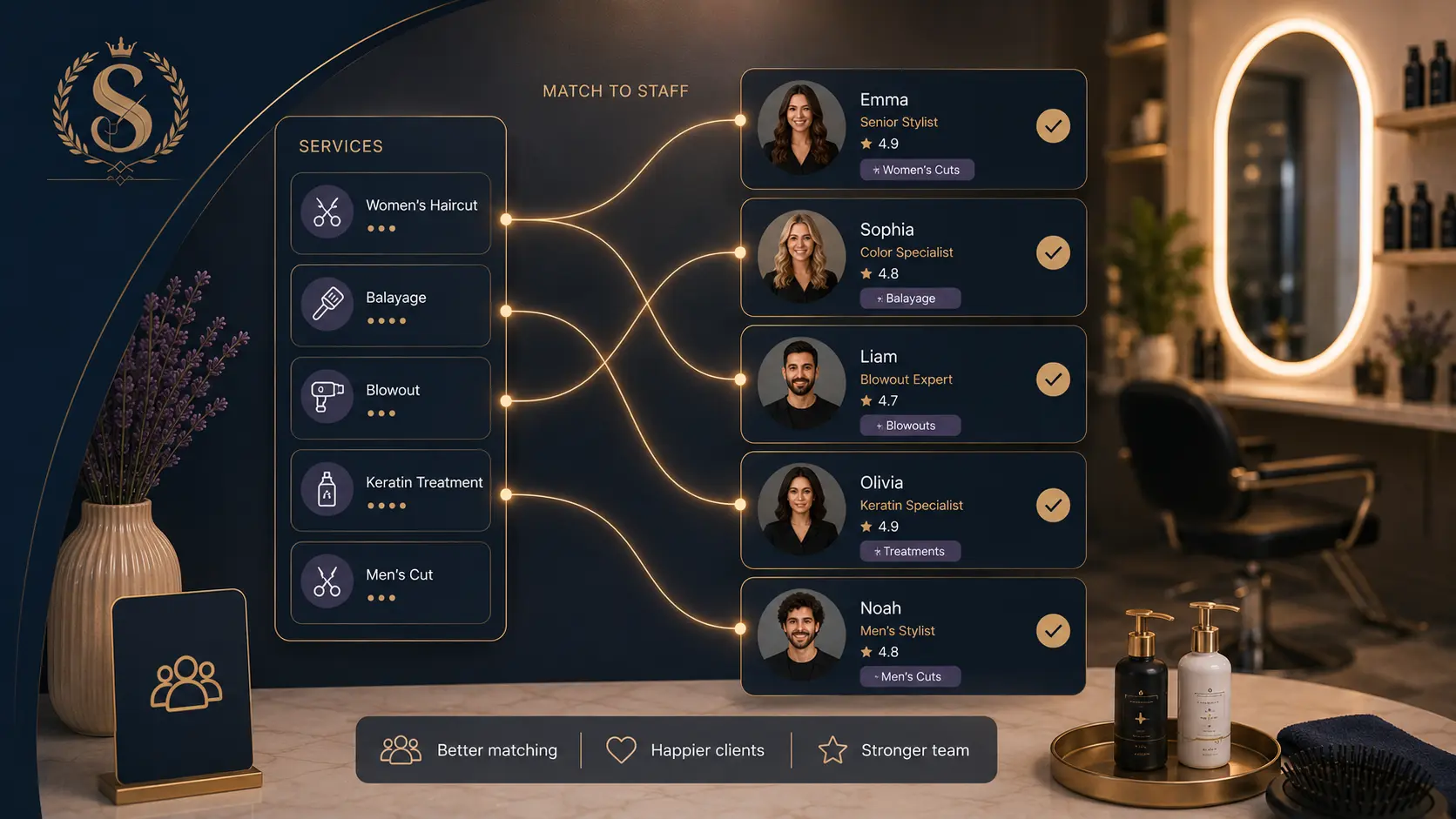
Assign each service only to staff members who can actually perform it. This keeps online booking accurate, prevents awkward rescheduling, and makes "first available staff" safer.
The goal is not to limit bookings. The goal is to show clients times that can really happen.
Who this is for
This guide is for salon owners, barbershop owners, nail studios, lash teams, and skincare clinics where staff members have different skills, roles, or service permissions.
It is especially useful if your service menu is growing or clients can book without messaging first.
Why service assignment matters
Online booking can only be accurate when the system knows which staff members can do each service.
Without service assignment, these problems appear:
- A client books nail art with someone who only does basic manicures.
- A color service lands on a junior staff member who cannot perform it.
- First available staff chooses the wrong person.
- The owner has to call the client to move the appointment.
- The team loses trust in online booking and starts checking everything manually.
Good service assignment removes a layer of manual checking.
Start with your service list
Write down every bookable service, not every tiny internal task.
For each service, note:
- client-facing name
- duration
- price
- category
- required skill or role
- staff who can perform it
Example:
| Service | Duration | Staff |
|---|---|---|
| Women's haircut | 45 min | Owner, Senior stylist |
| Root touch-up | 90 min | Owner, Colorist |
| Gel manicure | 60 min | Nail tech |
| Brow shaping | 20 min | Owner, Esthetician |
This simple map becomes the rulebook for booking.
Avoid assigning every service to everyone
It can feel easier to select all staff for all services, but that creates false availability.
Only assign a service to a staff member when:
- they are trained for it
- they are allowed to perform it alone
- the timing in the system matches how they work
- the salon would be comfortable if a client booked it with them online
If a staff member is still learning, keep the service manual or assign it only after their schedule is ready.
Use categories to make the setup easier
Categories help you review the service map without getting lost.
For example:
- Haircuts
- Color
- Nails
- Brows
- Skincare
- Consultations
Once grouped, check each category staff-by-staff. A colorist may need all color services, while a junior stylist may only need haircuts and blowouts.
Check durations by staff skill level
Sometimes two people can perform the same service, but not at the same speed.
If your booking system supports only one duration per service, choose the safer duration that protects the slower provider. If the time difference is large, consider separate services:
- Haircut with senior stylist: 45 min
- Haircut with junior stylist: 60 min
Only do this when the difference matters for the calendar. Too many service variations can make booking harder.
Example using a Styloving workflow
In Styloving, services can be connected to staff members so availability checks are more accurate. When a client books a service, the system can avoid showing staff who are not assigned to it.
A practical setup workflow:
1. Add the service with name, duration, price, and category. 2. Add active staff members. 3. Assign the service only to staff who can perform it. 4. Confirm each assigned staff member has working hours. 5. Test booking with a specific staff member. 6. Test booking with first available staff.
That last test is important. It confirms the booking flow is not simply finding free time, but finding the right person for the service.
Service assignment checklist
Use this before opening online booking:
- Every service has a clear client-facing name.
- Every service has a realistic duration.
- Every service has a price or clear pricing note.
- Each service is assigned only to trained staff.
- Staff working hours are set before testing availability.
- Breaks are added for staff who need blocked time.
- First available staff is tested for common services.
- Specialist services do not show general staff by mistake.
- Inactive staff are not bookable.
FAQ
Should every staff member be assigned to basic services?
Only if every staff member can perform those services at the quality and timing you expect. Basic does not always mean everyone should be bookable.
What if a service needs two staff members?
Most small-salon booking systems start with one staff owner per appointment. If a service needs two people, keep it manual or create a workflow your team can safely manage.
Should services be assigned during onboarding?
Yes, even a simple first pass is better than leaving every staff member available for every service.