Short answer
After every salon visit, track the details that will make the next appointment easier: what was done, products or formulas used, client preferences, staff notes, allergies or sensitivities, follow-up needs, and useful photos when appropriate.
Good client management is not about writing a novel. It is about keeping the few details your future self will wish you had.
Who this is for
This guide is for small salon owners, solo beauty professionals, barbers, nail techs, and skincare providers who want better client continuity without building a complicated CRM process.
It is especially useful if client details are currently spread across memory, DMs, paper cards, phone notes, or staff conversations.
Why client details get lost
Client information usually disappears because the team is busy. The appointment ends, the next client arrives, and the small details feel obvious in the moment.
Two weeks later, they are not obvious anymore.
That is when the salon starts asking:
- What color formula did we use last time?
- Did this client prefer quiet service or conversation?
- Which staff member handled the appointment?
- Was there a sensitivity or allergy note?
- Did we recommend a follow-up?
- Did the client want the same style again?
The goal of client management is to make the next visit feel prepared, not to create admin work.
What to track after every salon visit
1. The service performed
Record what actually happened, not only what the client originally booked. A client may book a haircut and leave with a treatment, toner, or add-on.
Useful fields:
- Service performed.
- Add-ons.
- Staff member.
- Date of visit.
- Appointment notes.
2. Technical details
For services where technical details matter, keep the specifics.
Examples:
- Color formulas and timing.
- Nail base, color, finish, and art details.
- Brow tint shade.
- Lash map.
- Skincare products used.
- Barber guards, fade height, and neckline preference.
The right technical notes depend on your service type, but the rule is simple: if it affects the next visit, track it.
3. Preferences
Preferences are not always technical. They can be part of the client experience.
Track notes such as:
- Likes morning appointments.
- Prefers no product after styling.
- Wants low-maintenance color.
- Sensitive scalp.
- Likes square nails, short length.
- Usually books every 4 weeks.
- Prefers SMS or email updates.
These details make the client feel remembered.
4. Safety and comfort notes
Keep important health, allergy, consent, or sensitivity notes where they are easy to review before service.
Do not over-collect. Only store what is relevant to the appointment and your business process.
5. Follow-up and rebooking context
After the visit, write down what should happen next.
Examples:
- Recommend root retouch in 6 weeks.
- Patch test needed before next color service.
- Book maintenance facial in 4 weeks.
- Client asked about bridal makeup package.
- Check product stock before next visit.
Follow-up notes help your business keep momentum without relying on memory.
A simple after-visit note template
Use this structure:
Service:
Staff:
What we did:
Products/formula:
Client preference:
Sensitivity/allergy note:
Recommended next step:
Follow-up date:
Photo needed? yes/no
Keep it short. A useful note can be 3 lines if it contains the right information.
Example using a Styloving workflow
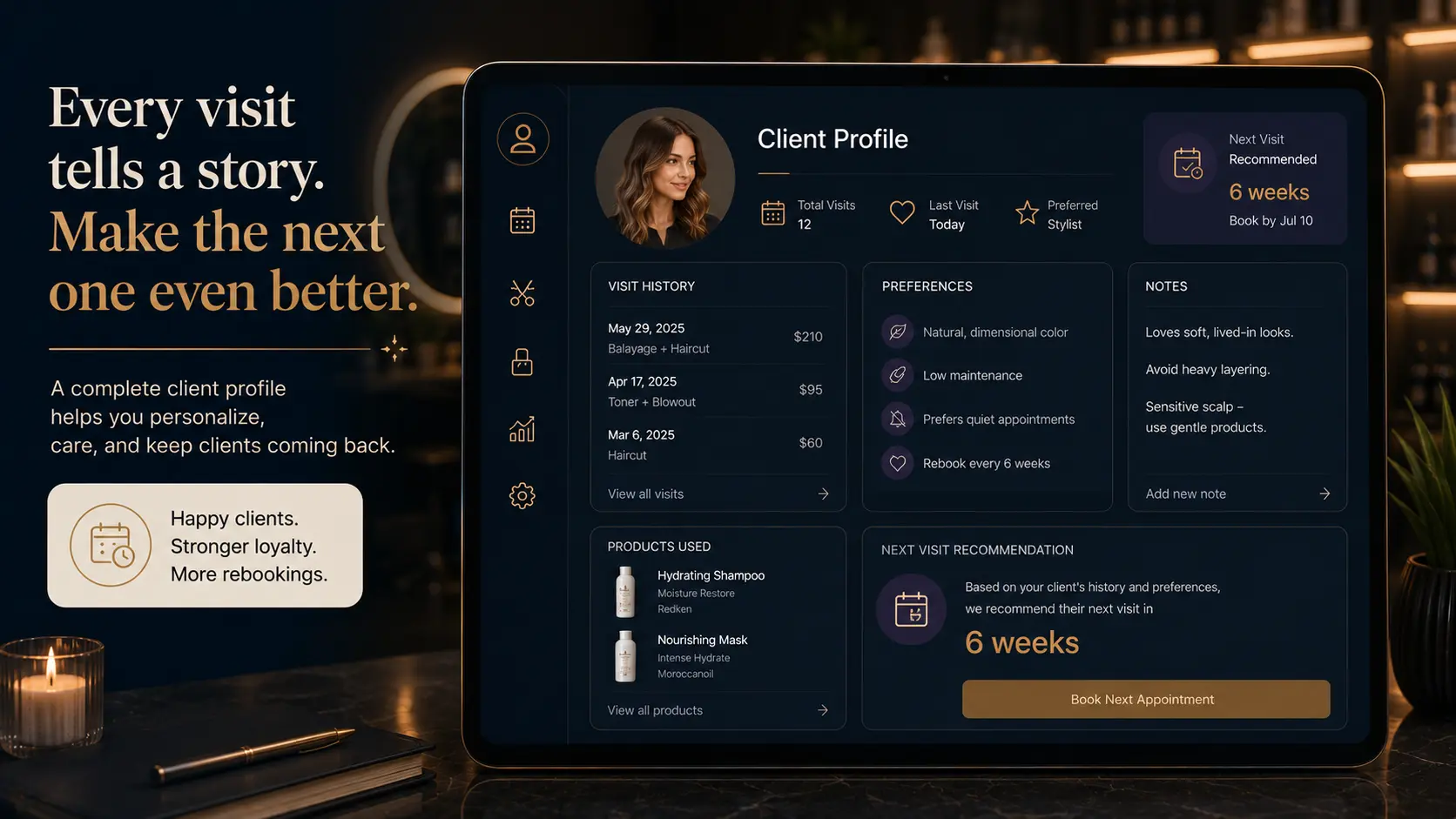
In Styloving, the client record can sit beside bookings, staff context, client notes, and treatment photos. A salon can look at a client's appointment history and add notes after the visit, instead of digging through messages later.
Example:
- Client: Sarah Miller
- Visit: Root retouch and gloss
- Staff: Ava
- Note: Used warm brunette gloss, client prefers softer face frame, book again in 6 weeks
- Next visit: Root maintenance
That record makes the next appointment easier for both the staff member and the client.
Client-management checklist
After each visit, ask:
- Did we record what service actually happened?
- Did we note the staff member?
- Did we capture any formula, product, or technique detail?
- Did we write the client's preference in plain language?
- Did we mark any safety or sensitivity notes?
- Did we recommend the next step?
- Did we add a photo if it helps future service?
- Can another staff member understand this note later?
FAQ
Do small salons really need client management software?
They may not need a complex CRM, but they do need a reliable place for booking history, notes, and preferences. The smaller the team, the more important it is to avoid scattered information.
Should I write notes after every appointment?
Yes, but keep them practical. Not every visit needs a long note. Write what will help the next appointment run better.
Should client notes live in Instagram DMs?
No. DMs are hard to search, easy to lose, and not designed for client records. Important details should live in a system your business controls.